 Yahxin.space
LLM Wiki Compiler LLM 维基编译器
A Claude Code and Codex-compatible plugin that compiles knowledge into a topic-based wiki — from scattered markdown files or entire codebases. Reduce context costs by ~90% and give your agent a synthesized understanding of any project.
一个兼容 Claude Code 和 Codex 的插件,可以将知识编译成基于主题的维基——无论是从零散的 markdown 文件 还是整个代码库 中提取。将上下文成本降低约 90%,并让你的经纪人对任何项目有综合的理解。
What’s New in v2.1 v2.1 新增内容
- Codex-compatible plugin metadata — install from the same
plugin/package root
Codex 兼容插件元数据 ——从同一插件/包根安装 - Skill-first Codex workflows — use natural prompts instead of Claude slash commands
技能 优先的 Codex 工作流程 ——使用自然提示代替 Claude 的同类指令 - Shared session context helper — one wiki context renderer for Claude hooks and Codex guidance
共享会话上下文助手 ——一个用于 Claude 钩子和 Codex 指导的维基上下文渲染器
What’s New in v2.0 v2.0 新增内容
- Codebase mode — generate wikis from code repositories, not just markdown files
代码库模式 ——从代码仓库生成维基,而不仅仅是 Markdown 文件 - Auto-detection —
/wiki-initdetects whether you’re in a codebase or knowledge project
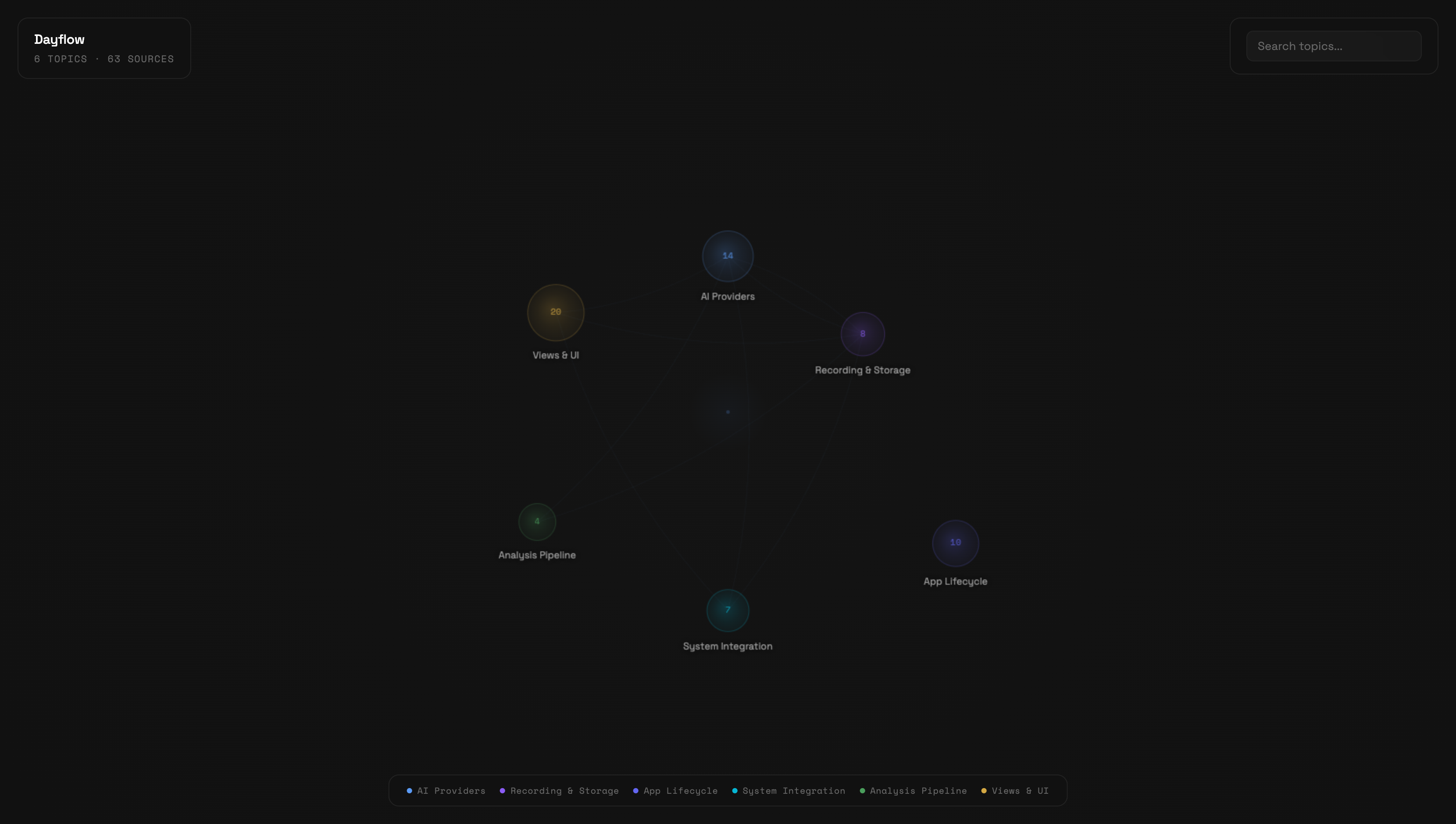
自动检测 ——/wiki-init检测你是在代码库还是知识项目中 - Knowledge graph visualization — interactive canvas-based graph of your wiki
知识图谱可视化 ——基于画布的互动图,展示你的维基
Inspiration 灵感来源
This plugin implements the LLM Knowledge Base pattern described by Andrej Karpathy:
该插件实现了 Andrej Karpathy 描述的 LLM 知识库 模式:
“Raw data from a given number of sources is collected, then compiled by an LLM into a.md wiki, then operated on by various CLIs by the LLM to do Q&A and to incrementally enhance the wiki, and all of it viewable in Obsidian. You rarely ever write or edit the wiki manually, it’s the domain of the LLM.”
“从一定数量的来源收集原始数据,然后由大型语言模型汇编成.md 维基,然后由 LLM 的各种 CLI 操作以进行问答和逐步增强维基,所有这些数据都可以在 Obsidian 中查看。你很少手动写或编辑维基,那是大型语言模型的领域。”
The key insight: instead of re-reading hundreds of raw files every session, have the LLM compile them into topic-based articles once, then query the synthesized wiki. Knowledge compounds instead of fragmenting.
关键的见解是:与其每次重读数百个原始文件,不如让大型语言模型先将它们编译成基于主题的文章,然后查询合成后的维基。知识积累而非碎片化。
What It Does 它的作用
You have 100+ files across meetings, strategy docs, codebases, and research. Every Claude session re-reads them. This plugin compiles them into topic-based articles that synthesize everything known about each subject — with backlinks to sources.
你有 100+个文件,涵盖会议、战略文档、代码库和研究。每次 Claude 的游戏会话都会反复阅读。该插件将这些内容汇编成基于主题的文章,综合每个主题的所有已知信息——并附有指向来源的反向链接。
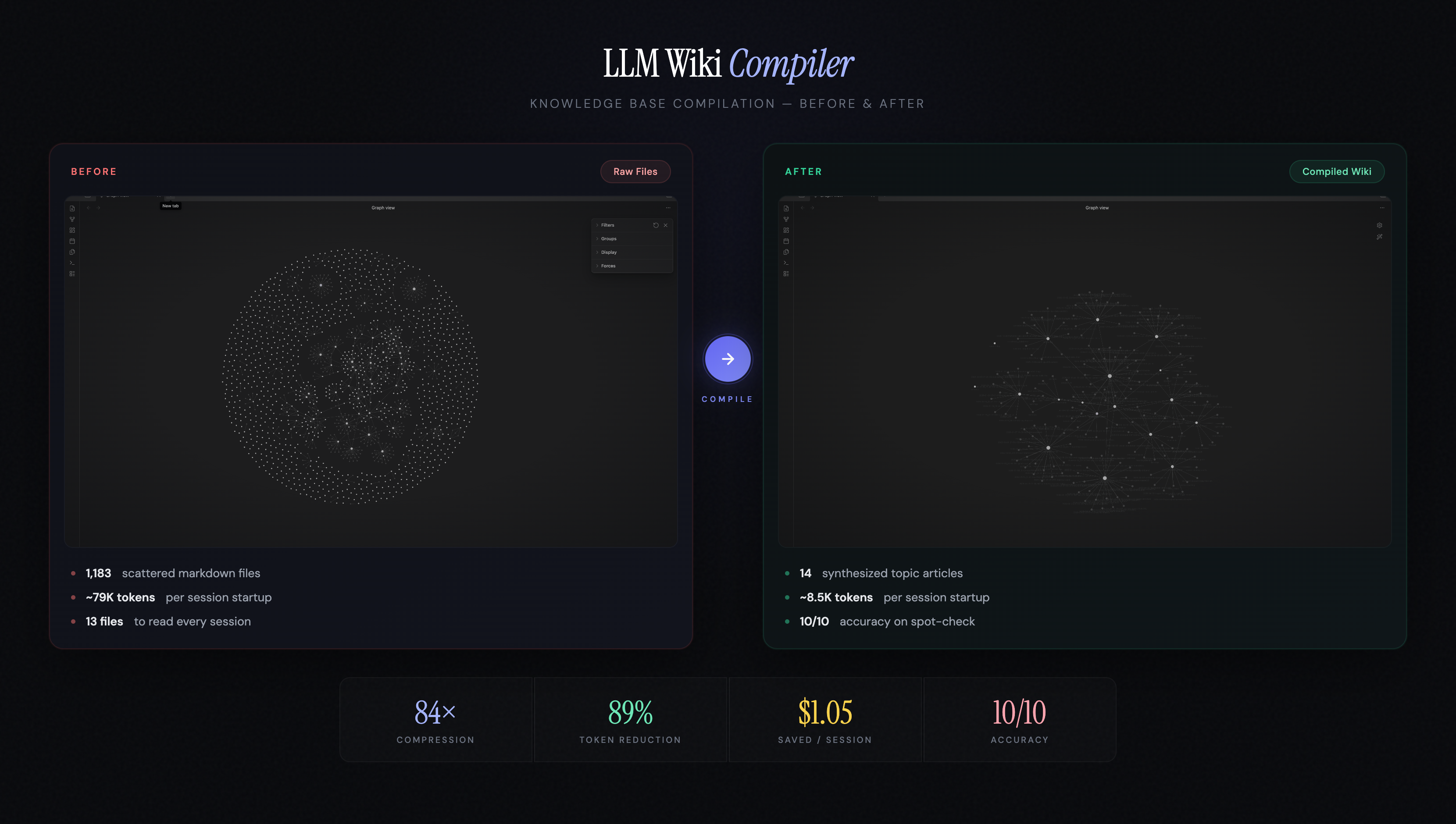
Before: Read 13+ raw files (~3,200 lines) per session After: Read INDEX + 2 topic articles (~330 lines) per session
之前: 每次会话读取 13+个原始文件(~3,200 行) 之后: 每场阅读索引+2 篇主题文章(~330 行)
How It Works 工作原理
flowchart LR
    subgraph Sources["📁 Raw Sources (you own)"]
        M1["meetings/"]
        M2["strategy/"]
        M3["research/"]
        M4["notes/"]
    end

    subgraph Commands["⚡ Commands"]
        INIT["/wiki-init<br/>samples files<br/>proposes structure"]
        CAPTURE["/wiki-capture<br/>link + context"]
        COMPILE["/wiki-compile<br/>batch compilation"]
        INGEST["/wiki-ingest<br/>single file, interactive"]
        SEARCH["/wiki-search<br/>find anything"]
        LINT["/wiki-lint<br/>health check"]
    end

    subgraph Wiki["📖 Compiled Wiki (LLM owns)"]
        INDEX["INDEX.md"]
        T1["topics/retention.md"]
        T2["topics/onboarding.md"]
        T3["topics/..."]
        C1["concepts/..."]
        SCHEMA["schema.md"]
    end

    Sources -->|"383 files · 13 MB"| COMPILE --> Wiki
    Sources -->|"1 link + context"| CAPTURE --> Wiki
    Sources -->|"1 file"| INGEST --> Wiki
    INIT -->|"creates config +<br/>article structure"| COMPILE
    Wiki -->|"13 articles · 161 KB<br/>84% fewer tokens"| LLM["🤖 Your LLM Agent<br/>reads wiki, not raw files"]
    LINT -.->|"checks"| Wiki
    SEARCH -.->|"searches"| Wiki
Install 安装
Clone the repo 克隆仓库
git clone https://github.com/ussumant/llm-wiki-compiler.git
Claude Code 克劳德密码
# Add as a local marketplace
claude plugin marketplace add /path/to/llm-wiki-compiler

# Install the plugin
claude plugin install llm-wiki-compiler

# Restart Claude Code for hooks to register
For a single Claude session without installing:
对于一个未安装的 Claude 会话:
claude --plugin-dir /path/to/llm-wiki-compiler/plugin
Codex 法典
This repo includes a Codex plugin manifest at plugin/.codex-plugin/plugin.json and local marketplace metadata at .agents/plugins/marketplace.json. Add this repository as a local Codex plugin marketplace, then install LLM Wiki Compiler from that marketplace.
该仓库包含 Codex 插件清单( plugin/.codex-plugin/plugin.json )和本地市场元数据(.agents/plugins/marketplace.json )。把这个仓库加为本地的 Codex 插件市场,然后从该市场安装 LLM Wiki Compiler 。
Codex does not use Claude slash commands. Invoke the same workflows with prompts:
Codex 不使用 Claude 的斩击命令。用提示调用相同的工作流程:
| Workflow 工作流程 | Claude Code 克劳德密码 | Codex prompt 法典提示 |
|---|---|---|
| Initialize 初始化 | /wiki-init | ”Initialize a wiki for this repo” “为本仓库初始化一个维基” |
| Global setup 全局设置 | /wiki-global-init | ”Set up my global wiki” “搭建我的全球维基” |
| Capture link 捕获链接 | /wiki-capture URL --context "why it matters" /wiki-capture URL —context “为什么重要” | “URL — capture this in my wiki” “网址——把它录到我的维基里” |
| Compile 编译 | /wiki-compile | ”Compile changed sources into the wiki” “将更改的源代码编译到维基中” |
| Ingest 吞咽 | /wiki-ingest path/to/file.md | ”Ingest this source into the wiki: path/to/file.md” “将此源导入维基:path/to/file.md” |
| Search 搜索 | /wiki-search architecture decisions /wiki-search 架构决策 | ”Search the compiled wiki for architecture decisions” “搜索编译维基以获取架构决策” |
| Query 查询 | /wiki-query what do we know about retention? /wiki-query 我们对保留了解多少? | “Answer from the compiled wiki: what do we know about retention?” “来自汇编维基的答案:我们对保留率了解多少?” |
| Lint 绒毛 | /wiki-lint | ”Lint the compiled wiki” “整理编译的维基” |
| Visualize 可视化 | /wiki-visualize | ”Launch the wiki knowledge graph” “启动维基知识图谱” |
| Migrate 迁移 | /wiki-migrate | ”Show a wiki-first startup migration report” “显示一个以维基为先的初创企业迁移报告” |
The shared session context helper is available at plugin/hooks/wiki-session-context. Claude calls it automatically through the SessionStart hook; Codex users can ask Codex to read the compiled wiki at session start until Codex hook registration is standardized.
共享会话上下文助手可在 插件/hooks/wiki-session-context 获取。Claude 通过 SessionStart 钩子自动调用;Codex 用户可以在会话开始时请求 Codex 阅读编译后的维基,直到 Codex 钩子注册标准化。
Quick Start 快速入门
Claude Code 克劳德密码
# 1. Initialize — auto-detects whether this is a codebase or knowledge project,
#    samples your files, proposes a domain-specific article structure
/wiki-init

# 2. Compile — reads all sources, creates topic articles (5-10 min first run)
/wiki-compile

# 3. Visualize — launch an interactive knowledge graph of your wiki
/wiki-visualize

# 4. Browse in Obsidian — open wiki/INDEX.md to see all topics with backlinks
After setup, Claude reads wiki articles automatically at session start — no special commands needed. The wiki updates incrementally when sources change.
设置后,Claude 在会话开始时自动阅读维基文章——无需特殊命令。维基会随着来源变化而逐步更新。
Codex 法典
Ask Codex:问法典:
Initialize a wiki for this repo
https://example.com/article — capture this in my wiki
Compile changed sources into the wiki
Launch the wiki knowledge graph
For ongoing sessions, ask Codex to start with wiki/INDEX.md, then read relevant topic articles before raw sources.
对于持续的会议,请让 Codex 先从 wiki/INDEX.md 开始,然后先阅读相关主题条目,再看原始资料。
Global and Local Wikis 全球与本地维基
LLM Wiki Compiler supports two layers:
LLM Wiki 编译器支持两层:
| Layer 层 | Default location 默认位置 | Use it for 用它做 |
|---|---|---|
| Global wiki 全局维基 | ~/Knowledge ~/知识 | Cross-project links, ideas, research, videos, bookmarks, and reusable patterns 跨项目链接、创意、研究、视频、书签和可重复使用的图案 |
| Local wiki 本地维基 | Current repo/folder with .wiki-compiler.json 当前仓库/文件夹与 .wiki-compiler.json | Deep project-specific architecture, decisions, source files, and operating knowledge 深入的项目特定架构、决策、源文件和操作知识 |
The default global folder is:
默认的全局文件夹是:
~/Knowledge
You can override it:
你可以覆盖它:
export LLM_WIKI_GLOBAL_DIR="$HOME/CompanyKnowledge"
Routing defaults:路由默认情况:
- “capture this in my wiki” → global wiki
“把这些记录在我的维基里” → 全球维基 - “capture this in this repo/project wiki” → local wiki
“在本仓库/项目维基中捕获此内容” →本地维基 - “capture this in both” → global and local
“在两者中捕捉此”→全球和本地 - no global wiki yet → initialize
~/Knowledgeautomatically from the global wiki template
目前还没有全局维基,→ 从全局维基模板自动初始化~/知识
Set it up explicitly with:
Set up my global wiki
Codebase Mode (New in v2.0)
Generate a wiki from a code repository — not just markdown files, but the full knowledge embedded in your codebase: architecture, API contracts, decision records, deployment configs, and gotchas.
Quick Start
# One command to set up and compile
/wiki-init --codebase
The compiler auto-detects your project type, discovers modules/services, finds knowledge files (READMEs, ADRs, API specs, Docker configs), and compiles everything into topic articles.
What It Scans
| File Type | Examples | What It Captures |
|---|---|---|
| Documentation | README.md, CLAUDE.md, ARCHITECTURE.md | Purpose, architecture, conventions |
| API contracts | *.proto, *.graphql, openapi.yaml | API surface, inter-service communication |
| Decision records | ADR-*.md, docs/adr/*.md | Key decisions and rationale |
| Infrastructure | docker-compose.yml, Dockerfile, k8s/*.yaml | Deployment topology, scaling |
| Operations | docs/runbooks/*.md, CHANGELOG.md | Gotchas, failure modes, version history |
| Config shape | .env.example, package.json | Environment requirements, dependencies |
With deep_scan: true, it also reads entry points, type definitions, and route files for richer articles.
Example Output
# auth-service

## Purpose [coverage: high -- 8 sources]
Handles user authentication and session management via JWT tokens.
All other services call auth-service to validate requests.

## Talks To [coverage: high -- 6 sources]
- **user-service** (REST: /api/users/:id) -- subscription status lookup
- **notification-service** (SQS: auth.password-reset) -- triggers email
- **billing-service** (gRPC) -- validates payment status before premium access

## Key Decisions [coverage: medium -- 3 sources]
- **JWT over sessions** -- stateless scaling, no shared session store (ADR-003)
- **Refresh token rotation** -- security requirement from compliance audit

## Gotchas [coverage: high -- 5 sources]
- Token expiry is 15 minutes, not 1 hour (changed in v2.3)
- Rate limiting on /auth/login is per-IP, not per-user
How It Differs from Google Code Wiki / DeepWiki
Those tools answer “what does this code do?” by parsing functions and generating API docs.
This tool answers “what does this project know?” by synthesizing documentation, decision records, deployment configs, and operational knowledge into articles an agent can navigate.
| Google Code Wiki / DeepWiki | LLM Wiki Compiler | |
|---|---|---|
| Input | Source code (AST parsing) | Knowledge files + optional code |
| Output | API docs + architecture diagrams | Synthesized topic articles with coverage indicators |
| Infrastructure | Hosted platform / server + embeddings | Zero infra — Claude Code plugin |
| Updates | Full regen on every commit | Incremental — only changed topics |
| Consumer | Developers reading docs | Your AI agent (and you) |
Monorepo / Microservice Support
For monorepos, the compiler detects service boundaries by looking for directories with their own manifest files (package.json, go.mod, etc.). Each service becomes a topic article. Cross-cutting concerns (infrastructure, testing, deployment) get their own articles.
📚 Wiki compiled — 8 topics from 47 files

  Topics created:
  ├── auth-service (12 sources)
  ├── billing-service (9 sources)
  ├── notification-service (6 sources)
  ├── api-gateway (5 sources)
  ├── infrastructure (4 sources)
  ├── testing (3 sources)
  └── deployment (3 sources)

  Concepts discovered:
  ├── error-handling-strategy — shared pattern across 4 services
  └── auth-flow — touches auth, gateway, billing
Codebase Configuration
{
  "version": 2,
  "mode": "codebase",
  "name": "My Project",
  "sources": [{ "path": "./", "exclude": ["node_modules/", "dist/", ".git/", "wiki/"] }],
  "output": "wiki/",
  "service_discovery": "auto",
  "deep_scan": false,
  "knowledge_files": ["README.md", "CLAUDE.md", "*.proto", "openapi.*", "ADR-*.md", "Dockerfile"]
}| Field | Description |
|---|---|
mode | "codebase" enables code-aware topic discovery |
service_discovery | "auto" detects monorepo vs single project |
deep_scan | true to also read source code files for richer articles |
knowledge_files | Glob patterns for priority documentation files |
Knowledge Graph Visualization
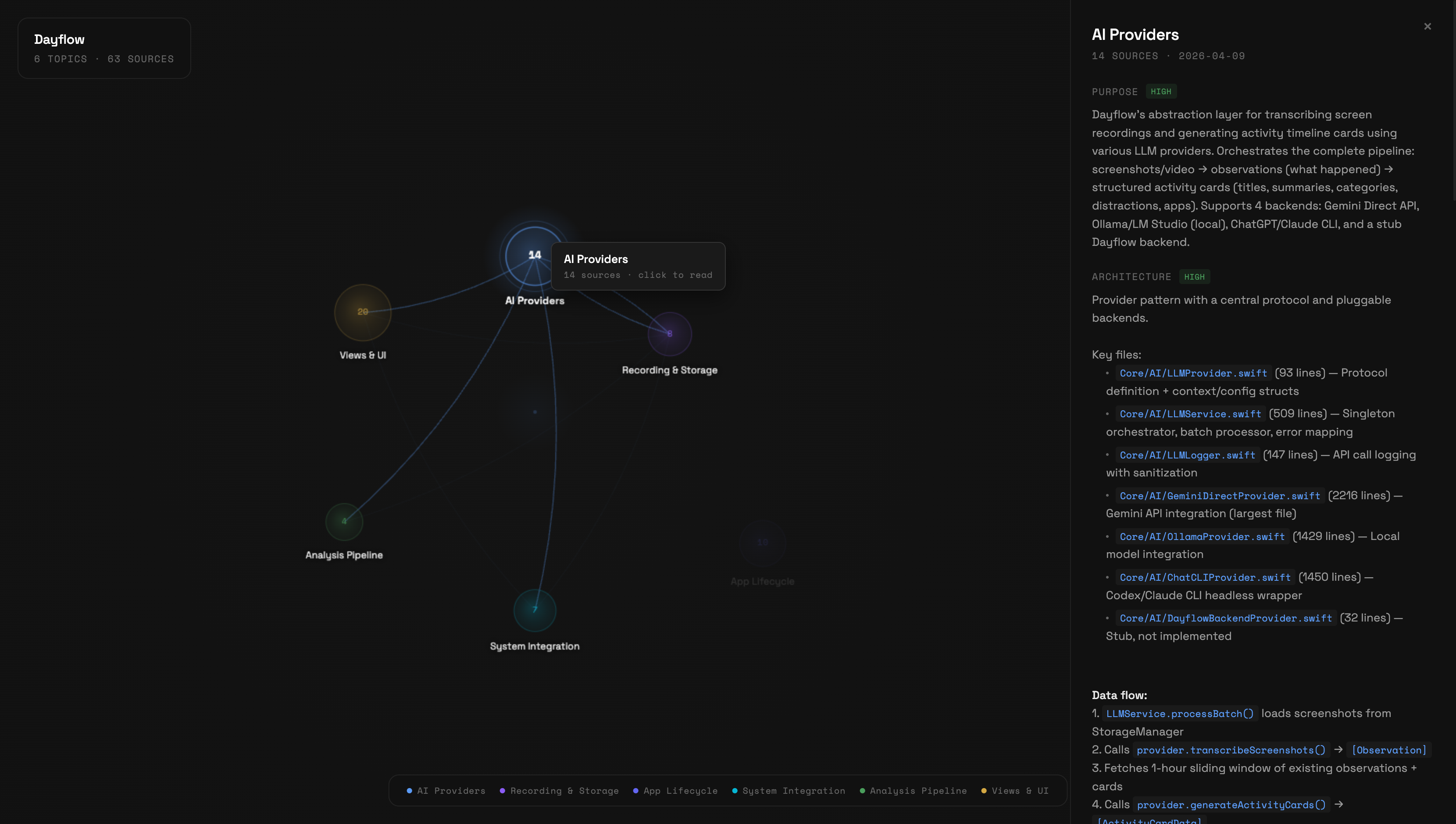
See your compiled wiki as an interactive knowledge graph. Topics appear as nodes sized by source count, concepts as connecting edges.
/wiki-visualize- Hover nodes to see source count and highlight connections
- Click a node to read the full article in a side panel with coverage badges
- Shift-click a node to expand its neighborhood — concept-connected topics light up, others dim. Shift-click again to keep walking the graph (depth 2, depth 3, …). The HUD shows how many nodes and seeds are currently lit.
- Hover edges to see concept names linking topics
- Search to filter topics by name or alias
- Escape to close the article panel or clear the expansion
Canvas-based, zero dependencies, Nothing Design System tokens (Space Grotesk + Space Mono typography). Works with both knowledge mode and codebase mode wikis.
You can also run it manually without the plugin:
node plugin/visualize/server.js --wiki-dir path/to/wiki/
# Open http://localhost:3848
Fetch from External Sources
Your context isn’t always on disk — a lot of it lives in services like X bookmarks, Readwise highlights, or Pocket saves. /fetch-bookmarks <source> pulls that content into a local directory that /wiki-compile can consume alongside your regular sources.
Optional — skip it entirely if all your sources are already local markdown.
Quick Start
/fetch-bookmarks x
First run walks you through:
- Checking that Node.js 20+ is installed
- Installing Field Theory CLI (MIT-licensed, free) globally via npm — one consent prompt
- Syncing your X bookmarks using Chrome cookie auth (no X API key needed)
- Adding
~/.ft-bookmarks/md/to your.wiki-compiler.jsonsources
After that, /fetch-bookmarks x just resyncs. Run /wiki-compile whenever you want bookmarks folded into topic articles.
Auto-Sync (Set and Forget)
Manual syncing gets forgotten. Install a daily background job:
/fetch-bookmarks schedule x
On macOS this writes a launchd plist to ~/Library/LaunchAgents/dev.llm-wiki-compiler.x-sync.plist that runs ft sync && ft md daily at 03:00 local. No LLM tokens, no Claude Code needed — pure shell. On Linux/WSL you get a crontab snippet to paste.
The /wiki-compile step stays manual by design — it needs an LLM and your judgment. When you next open Claude Code in a wiki project, the session-start hook tells you how many new bookmarks have arrived since the last compile, so your intent translates to action without you having to track dates.
Uninstall with /fetch-bookmarks schedule x --uninstall (or launchctl unload manually).
Available Sources
| Source | Status | Backend |
|---|---|---|
x | Shipped | Field Theory CLI (MIT) |
readwise | Planned | TBD |
pocket | Planned | TBD |
github-stars | Planned | TBD |
How It Works
/fetch-bookmarks is a thin dispatcher. Each source has its own adapter at plugin/skills/wiki-compiler/adapters/<source>.md that handles dependency checks, auth, sync, and wiring the output directory into your wiki config. Adapters delegate to existing open-source tools rather than reimplementing fetch logic — so you get a stable plugin surface (/fetch-bookmarks x) while the heavy lifting is maintained upstream.
Requirements
- Node.js 20+ (for Field Theory CLI)
- Chrome (for first-time X cookie sync — this is a Field Theory CLI limitation)
Contributing a New Adapter
Copy plugin/skills/wiki-compiler/adapters/x.md and follow the contract documented in plugin/commands/fetch-bookmarks.md: preflight, consent, sync, markdown output, wire into sources[], suggest compile.
Capture Links With Context
The primary UX is: paste a link and say “capture this in my wiki.” You do not need to remember command names.
In Codex:
https://example.com/article

capture this in my wiki
Add context when you have it:
https://example.com/article

capture this in my wiki

Context: Relevant to Codex plugin onboarding and skill discovery.
Claude Code users can use the explicit command form:
/wiki-capture https://example.com/article --context "Relevant to Codex plugin onboarding and skill discovery"
The capture flow is adapter-based:
| Source | Adapter | What gets saved |
|---|---|---|
| Web article | capture-web | readable page text, metadata, relevance notes |
| YouTube | capture-youtube | transcript evidence, timestamps, workflow notes when relevant |
| X/Twitter link | capture-x | post/thread text or bookmark source, date-aware relevance notes |
Captured links are written to wiki-sources/captures/ inside the target wiki as markdown with frontmatter, the original URL, captured date, user context, extracted content, relevance notes, and candidate wiki connections. The wiki then uses the same ingest/compile logic to update existing topics or propose a new topic/concept.
Connector Roadmap
The capture system is intentionally adapter-based. Future connectors should feed durable, provenance-rich source markdown into the same compiler pipeline instead of writing topic articles directly.
Planned connector shape:
connector pulls context
→ normalizes to markdown with metadata
→ writes to wiki-sources/{connector}/
→ adds that folder to sources[]
→ wiki compile builds topic/concept connections
Candidate connectors:
| Connector | Use case |
|---|---|
| Granola | Meeting notes, summaries, decisions, and follow-ups |
| Google Drive / Docs | Docs, strategy notes, specs, and research folders |
| Slack | High-signal threads, decisions, and customer/team context |
| Linear / GitHub Issues | Roadmap, bugs, project decisions, and implementation context |
| Readwise / Pocket | Reading highlights and saved articles |
The key rule: connectors create source material; the wiki compiler owns synthesis and connections.
How It Works (Knowledge Mode)
Commands
| Command | Purpose |
|---|---|
/wiki-init | One-time setup — auto-detects markdown directories, samples files, proposes custom article structure |
/wiki-global-init | Initialize the default global wiki at ~/Knowledge or LLM_WIKI_GLOBAL_DIR |
/wiki-compile | Compiles source files into topic articles (incremental — only recompiles changes). Generates schema.md on first run. |
/wiki-capture | Capture a URL plus context, normalize it into markdown, and connect it to existing topics/concepts |
/wiki-ingest | Add a single source interactively — read, discuss key takeaways, update relevant wiki articles |
/fetch-bookmarks | Pull bookmarks from external services (X today; Readwise, Pocket planned). schedule <source> wires a daily launchd job. |
/wiki-search | Search across wiki articles by keyword or phrase |
/wiki-lint | Health checks — finds stale articles, orphan pages, missing cross-references, contradictions, low coverage |
/wiki-query | Optional — Q&A against the wiki. Can file useful answers back into wiki articles. |
/wiki-migrate | One-time migration — analyzes your AGENTS.md startup reads, shows which are covered by wiki, generates replacement |
/wiki-visualize | Launch interactive knowledge graph of your compiled wiki |
/wiki-upgrade | Update the plugin to the latest version from GitHub |
The primary workflow is: init → compile → add to AGENTS.md → done. After that, Claude reads the wiki automatically. /wiki-query is a convenience for testing or quick lookups.
Staged Adoption (The Key Feature)
The plugin never modifies your existing CLAUDE.md or AGENTS.md. Instead, it injects context via a SessionStart hook with three modes:
| Mode | What Happens | Your Existing Setup |
|---|---|---|
| staging (default) | “Wiki available — check it when you need depth” | Completely unchanged |
| recommended | ”Check wiki articles before raw files” | Unchanged, but Claude prioritizes wiki |
| primary | ”Wiki is your primary knowledge source” | You can optionally simplify startup reads |
Change mode by editing .wiki-compiler.json:
{ "mode": "staging" } → { "mode": "recommended" } → { "mode": "primary" }
What Gets Compiled
During /wiki-init, the compiler samples your source files and proposes an article structure that fits your domain. You approve (or tweak) the sections before anything gets compiled.
For example, a product team’s wiki might get:
- Summary — Timeline — Current State — Key Decisions — Experiments & Results — Gotchas — Open Questions — Sources
While a research wiki might get:
- Summary — Key Findings — Methodology — Evidence — Gaps & Contradictions — Open Questions — Sources
And a book notes wiki might get:
- Summary — Characters — Themes — Plot Threads — Connections — Quotes — Sources
The structure is saved in .wiki-compiler.json and can be edited anytime. Summary and Sources are always included.
Coverage Indicators (Best of Both Worlds)
Every section includes a coverage tag so you (or your AI agent) know when to trust the wiki vs when to read raw sources:
## Summary [coverage: high -- 15 sources]
...trust this, it's well-sourced...

## Experiments & Results [coverage: medium -- 3 sources]
...decent overview, check raw files for details...

## Gotchas [coverage: low -- 1 source]
...read the raw gotchas.md directly...
- high (5+ sources) — trust the wiki section directly
- medium (2-4 sources) — good overview, check raw sources for granular questions
- low (0-1 sources) — read the raw sources listed in that section
This gives you the speed of the wiki (84% fewer tokens) without sacrificing accuracy. Your agent reads the wiki first, and only falls back to raw files for low-coverage sections.
Time-Decay Awareness
Tweets from 2022 and tweets from 2026 don’t carry equal weight on questions about AI tooling or UI patterns — so the compiler doesn’t treat them as equal either. For time-sensitive topics (AI, design, growth tactics, bookmark-heavy topics), the compiler:
- Extracts a source date from each input (frontmatter
posted_at/date, filename date, or mtime) - Orders Timeline and Key Decisions bullets newest-first, date-prefixed
- Flags claims older than 18 months with ⚠️
- Adds
[as of YYYY-MM]tags to sections resting mostly on aging sources - In conflicts, prefers the newer source and notes the shift
Stable topics (career, personal growth, visa work) use looser thresholds (24/48 months). Nothing gets deleted — stale entries stay for historical context, just clearly marked.
Obsidian Compatible
The wiki output is plain markdown with Obsidian-style [[wikilinks]]. Open wiki/INDEX.md in Obsidian and you’ll see the full knowledge base with bidirectional links to source files.
Concept Articles (Cross-Cutting Patterns)
After compiling topic articles, the compiler looks for patterns that span 3+ topics and generates concept articles in wiki/concepts/. These are interpretive, not just factual — they answer “what does this pattern mean?” not just “what happened?”
Examples from a real project:
- “Speed vs Quality Tradeoff” — 6 instances where this decision appeared across retention, push notifications, and experiment design
- “Cross-Team Decision Patterns” — communication patterns and decision dynamics synthesized from 24 meetings
- “Evolution of Retention Thinking” — how the approach changed from Oct 2025 to Apr 2026 across analytics, strategy, and experiments
Concept articles are discovered automatically during compilation. You can also seed them in schema.md if you know what patterns you want tracked.
Schema Document
On first compile, a schema.md is generated in your wiki output directory. It defines your wiki’s structure: topic list, naming conventions, article format, and cross-reference rules.
You can edit schema.md to rename topics, merge them, or add conventions. The compiler reads it before each run and respects your changes. New topics get added automatically with an evolution log entry.
Wiki Lint
Run /wiki-lint to check wiki health:
- Stale articles — sources changed since last compile
- Orphan pages — articles with deleted/missing sources
- Missing cross-references — topics sharing 3+ sources that don’t link to each other
- Low coverage sections —
[coverage: low]tags flagged for improvement - Contradictions — conflicting facts across articles (e.g., different dates for same event)
- Schema drift — topics in wiki/ not listed in schema.md, or vice versa
Query Filing
When /wiki-query produces a useful synthesis that connects information across topics, it offers to file the answer back into the relevant wiki article. Your explorations compound in the knowledge base instead of disappearing with the session.
Configuration
.wiki-compiler.json (created by /wiki-init):
{
  "version": 2,
  "name": "My Project",
  "mode": "staging",
  "sources": [
    { "path": "Knowledge/", "exclude": ["wiki/"] },
    { "path": "docs/meetings/" }
  ],
  "output": "Knowledge/wiki/",
  "topic_hints": ["retention", "onboarding"],
  "link_style": "obsidian"
}
| Field | Description |
|---|---|
version | Config version (2 for latest) |
name | Display name for the knowledge base |
mode | Integration mode: staging / recommended / primary — OR codebase for code repositories |
sources | Directories to scan |
output | Where compiled wiki lives |
article_sections | Article structure — generated during /wiki-init based on your content (see below) |
topic_hints | Optional seed topics to guide classification |
link_style | obsidian (wikilinks) or markdown (standard links) |
service_discovery | (codebase mode) auto or manual — how to detect modules/services |
knowledge_files | (codebase mode) Glob patterns for priority documentation files |
deep_scan | (codebase mode) true to also read source code files |
Custom Article Structure
The article_sections array defines what sections appear in each topic article. It’s generated during /wiki-init by sampling your source files — the compiler proposes sections that fit your domain, and you approve or tweak them.
"article_sections": [
  { "name": "Summary", "description": "standalone briefing of the topic", "required": true },
  { "name": "Key Findings", "description": "main discoveries and insights" },
  { "name": "Methodology", "description": "approaches and methods used" },
  { "name": "Open Questions", "description": "unresolved threads and gaps" },
  { "name": "Sources", "description": "backlinks to all contributing files", "required": true }
]
You can edit this array anytime — add, remove, or rename sections. The compiler will use your updated structure on the next /wiki-compile run. Summary and Sources are required and cannot be removed.
If article_sections is missing (older configs), the compiler falls back to a default template.
Safety Guarantees
- Source files are never modified — the compiler only writes to the output directory
- The wiki can be deleted and regenerated at any time from source files
- Your CLAUDE.md and AGENTS.md are never touched — context injection happens via hooks
- Rollback anytime — change mode back to
stagingor delete.wiki-compiler.json
Cost Savings (Real Data)
Tested on a real project with 1,183 markdown files across meetings, strategy docs, session histories, and research notes.
Token Reduction
| Without Wiki | With Wiki | |
|---|---|---|
| Session startup context | ~79K tokens (13 files) | ~8.5K tokens (INDEX + 2-3 articles) |
| Per-question research | ~8,000 tokens (10+ files) | ~600 tokens (1 article) |
| Reduction | — | 89% |
Compilation Costs
| Tokens | Cost (Opus) | Cost (Sonnet) | |
|---|---|---|---|
| First compilation | ~880K | ~$13 | ~$2.60 |
| Daily incremental | ~100K | ~$1.50 | ~$0.30 |
| Break-even | — | First session | First session |
Accuracy
We spot-checked wiki articles against their raw source files:
- 10/10 key facts accurately synthesized — no fabrication, no missing critical details
- Coverage indicators are honest — sections marked
[coverage: high]had 5+ contributing sources - Trade-off is transparent — wiki captures ~90% of raw file content; coverage tags tell you when to fall back to raw sources for the remaining 10%
Compression
- 1,183 files → 14 topic articles — 84x compression
- Session startup: 13 file reads → 1 INDEX + 2-3 topic articles — 89% fewer tokens
- ~15/M input tokens)
This is the main way to use the wiki long-term. After you’ve compiled and spot-checked the output, add this to your project’s AGENTS.md or CLAUDE.md:
## Knowledge Base

A compiled knowledge wiki is available at \`{your output path}/\`.

**Session startup:** Read \`wiki/INDEX.md\` for a topic overview, then read
specific topic articles relevant to your current task.

**Using coverage indicators:** Each section has a coverage tag:
- \`[coverage: high]\` -- trust this section, skip the raw files.
- \`[coverage: medium]\` -- good overview, check raw sources for granular questions.
- \`[coverage: low]\` -- read the raw sources listed in that section directly.

**When you need depth:** Check the article's Sources section for links to
raw files. Only read raw sources for medium/low coverage sections or when
you need very specific detail.

**Never modify wiki files directly** -- they are regenerated by \`/wiki-compile\`.
Once this is in your AGENTS.md, Claude automatically uses the wiki every session with smart fallback. High-coverage sections save tokens. Low-coverage sections point Claude to the exact raw files it needs.
When to add this: After running /wiki-compile at least once and validating that the topic articles accurately reflect your knowledge.
Advanced
Incremental Compilation
After the first full compile, /wiki-compile only recompiles topics whose source files changed. INDEX.md is always regenerated.
Force Full Recompile
/wiki-compile --full
Compile Single Topic
/wiki-compile --topic retention
Interactive Ingest
Add sources one at a time with /wiki-ingest:
/wiki-ingest path/to/new-meeting-notes.md
The compiler reads the file, shows you key takeaways, asks what to emphasize, then updates all relevant topic articles. A single source might touch multiple topics — the compiler handles the cross-referencing.
This is Karpathy’s recommended workflow for staying involved with your knowledge base as it grows. Use /wiki-compile for batch processing, /wiki-ingest for interactive single-source additions.
Wiki Search
Search your compiled wiki:
/wiki-search retention experiments
Searches topic names first (fast), then full article content if needed. Results include coverage indicators so you know when to trust the wiki vs read raw sources.
For synthesis questions that require connecting multiple topics, use /wiki-query instead.
For large wikis (100+ topics), consider adding qmd as an MCP server for hybrid BM25/vector search with LLM re-ranking.
Migrate to Wiki-First Startup
Once your wiki is compiled and spot-checked, run /wiki-migrate to switch your AGENTS.md from reading raw files to reading the wiki:
/wiki-migrate

Wiki Migration Report for "My Project"

Current startup: 13 file reads

✅ gotchas.md → covered by analytics [coverage: high]
✅ product-context.md → covered by product [coverage: high]
⚠️ reporting-backlog.md → partially covered [coverage: medium]
❌ acceptance-criteria.md → not covered (operational checklist)

Summary: 10/13 reads can be replaced
Estimated savings: ~79K → ~8.5K tokens (89% reduction)
The command generates a replacement startup section and applies it with your confirmation.
Stale Wiki Detection
The plugin automatically detects when source files have changed since the last compile. Enable it in .wiki-compiler.json:
{ "auto_update": "prompt" }
With prompt mode, the SessionStart hook counts changed files and warns:
“Wiki may be stale — 42 files changed since last compile (2026-04-06). Run /wiki-compile to update.”
Set to "off" (default) to disable.
Scheduled Compilation
Use Claude Code’s /schedule to set up daily automatic compilation.
Updating the Plugin
From inside Claude Code:
/wiki-upgrade
This pulls the latest version from GitHub and shows what changed. Restart Claude Code after to load new commands and hooks.
If /wiki-upgrade isn’t available yet (older version), update manually:
cd /path/to/llm-wiki-compiler && git pull
claude plugin update llm-wiki-compiler
# Then restart Claude Code
License
MIT